This episode of Fieldmotion's Growth Hub covers some simple, easy to make social media posts that fits with any trades business, all within the free version of Canva. These posts are ideal for building trust from your customer base and keeping posts regular so you can rank better amongst competitors. From converting Google Reviews into posts, to reminding customers about relevant seasonal changes that could affect them.
Transcript:
Hi everyone, it's Adam from Fieldmotion here, and in this video we'll be talking a little bit about how to turn a Google review into content and then a couple of other ideas that I've had just to kind of what can be used to kind of build out that content calendar.
Turning a Google Review into a Post
So, right away we've got Brian's Plumbing, and then we've got a quote here. So, 'We've been going to Brian for years now, and he's never let us down.' So, you want to kind of divide your sort of logo from the quote, and then the quote from the person saying it. And you want to keep these, the font you're using, quite consistent. You know, it's all about the brand guideline, all about consistency.
You know, people will be able to associate your brand over time with this kind of style. And you can see I've just kind of put a couple of circles in just to kind of build out the look of it because it can look a little bit empty without, you know, anything filling it out.
Only Use Public Information
And then I just wanted to note that you want to kind of use only publicly available information. You know, you don't want to kind of GDPR. You don't want to use anyone's email. You don't want to, you know, only use what they're also comfortable with sharing with you.
Asking for Reviews
So, a lot of time to get these kind of reviews, you want to kind of go to, you know, people you've just done a job for. You know, you've done a really good service, you've gone that extra mile, to say, 'Hey, look, you know, could you leave a Google review and, you know, would you mind me just using it for LinkedIn, Facebook?' You know, this is sort of a LinkedIn resolution, the 1200 by 1200. LinkedIn uses typically square graphics. So, that's the Google reviews one.
It's quite simple. Again, if you've seen the Canva kind of video, it's a great video for just learning the basics of Canva to be honest. And you'll be able to, you know, knock this out in a couple of minutes really. Because you've already got the text from the review sorted.
Seasonal Posts: Spring
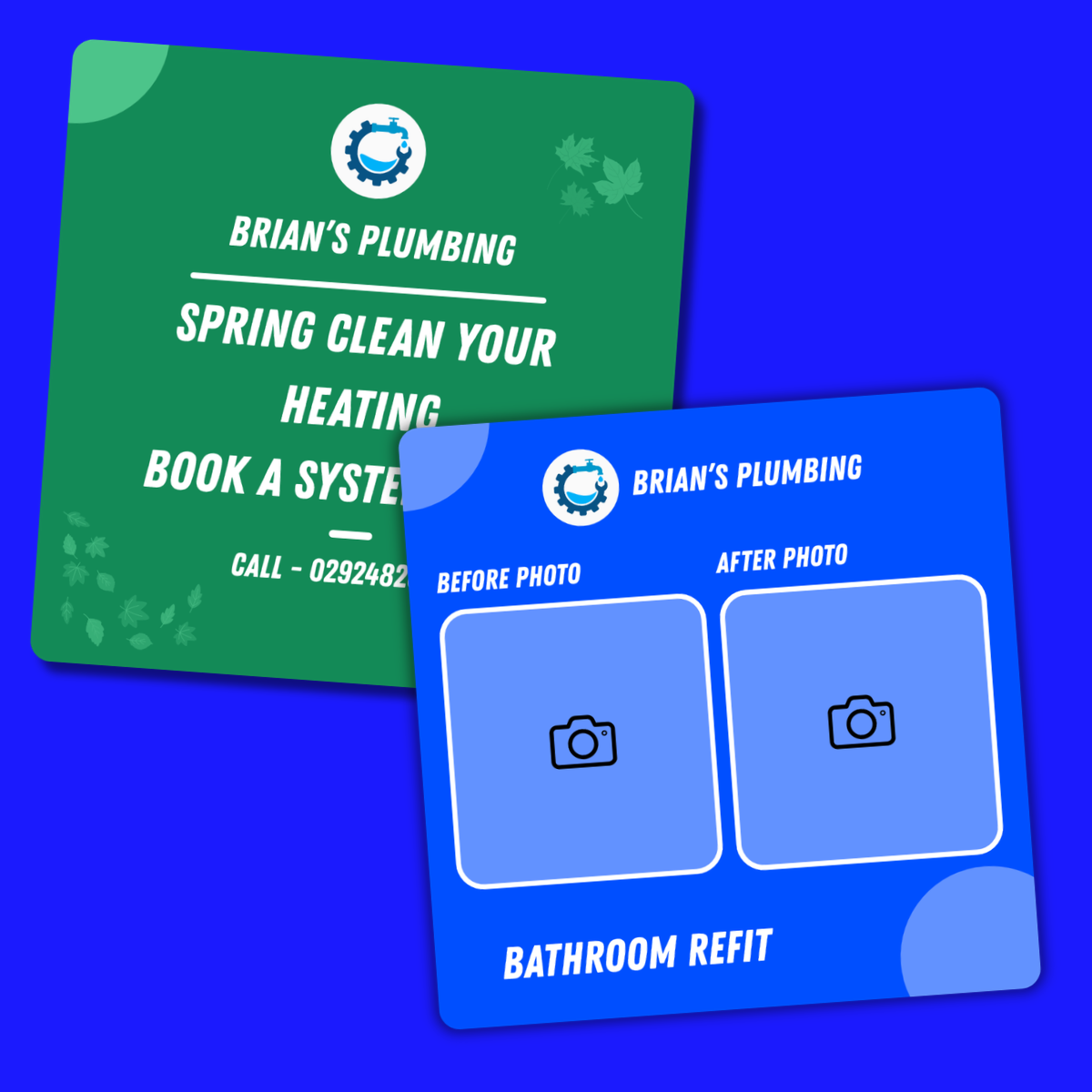
And then I wanted to kind of talk about seasonal posts. So, this is a way to kind of get people thinking, you know, about your business during certain periods. You know, spring cleaning, everyone's, you know, in the mind to kind of tidy things up. And maybe they've put something off for a long, long time, maybe it's a job that they want done.
And you're just kind of saying, 'Look, hey, you know, spring's come along, you know, I can, you know, do a system check, you know, for you, you know. Call this number below.' It's just a way to kind of get people thinking about your business at certain key periods in time. And just kind of sort of elevate the amount of business you get within this period. You know, it's all the timing of these things.
Seasonal Posts: Winter
And then another big example is winter. I've just used plumbing as an example. You know, Brian's Plumbing is probably going to be the company that we kind of go with for a lot of these examples. But I'll probably mix that up every so often.
But winter, such a big time for pipes freezing over. We've had a lot of really bad winters, unfortunately, around Northern Ireland. And it can be a really good way just to kind of remind your audience of these really key periods coming up. People are so busy that this could be, this could, you know, hit them at a really good time.
And 'I really should get this, you know, checked, just to make sure everything's OK.' And, you know, or even if something does go wrong, they'll think of you because they'll think of the post that they've seen. And again, just a little, you know, phone number or your website.
Before and After Photos
And then this is another great one. This is just for really firing this kind of content out. These guides will be available, by the way, below. And you can kind of tweak them to whatever you want.
But a before and after photo is such a good way to kind of show what you're so good at. It gives people a visual idea of what to expect. And it's just at a glance they'll be able to see, yep, you've fixed a boiler or you've fixed a radiator, you know, something like that. And you can just literally drag the image, drop it in and then just curve the corners.
Again, that Canva business card video is such a good video just to show you kind of all those basics of this.
Wrapping Up
But yeah, that's really all I wanted to kind of show you is just kind of ways to kind of build that content calendar further. And just some really, you know, really simple ideas, but gives you an idea of what to think about going forward as well. And you can, you know, you'll be able to use this to bounce off new ideas as well. So that's been me, Adam from Fieldmotion, and this has been Fieldmotion's Growth Hub.
Thank you very much for watching.